Team and security

Role-based permissions for Online Retail

Role-based permissions for Online Retail in iCRM in UAE: decide what each role in your team can see and change. Part of iCRM for Online Retail.

  • Team and security area
  • Packing and delivery in your work
  • Web, mobile and desktop

Get iCRM working for your business

1000 characters remaining

Prefer to talk? Call (+91) 97122 00017 or visit contact

  • No obligation
  • Quick response
  • Your data is safe

What are role-based permissions?

Rules that decide what each role in your shop can see and change, set once for the role instead of person by person.

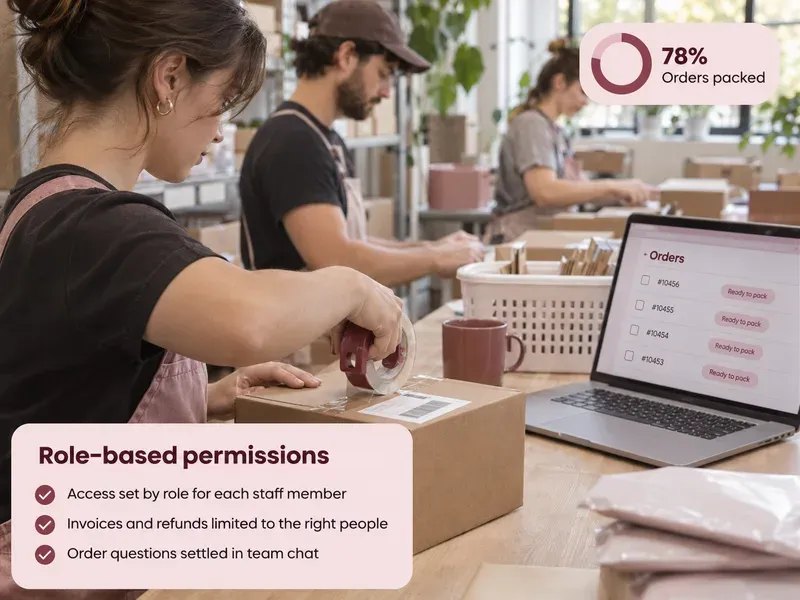
Role-based permissions let a business decide what each role can open and change. In iCRM an online shop sets this for roles such as packing, delivery, buyer support and accounts. Packing staff see the orders they handle, while invoices, payments and refunds stay with the people who deal with the money. Give someone a role and they get that role's access; change their role and their access follows.

  • Use case

    Set access by role

    Decide once what each role can open and change, such as packing, delivery, buyer support or accounts.

    • Access set for each role
    • Set once for everyone in the role
    • Changed when your shop changes
  • Use case

    Keep money and staff papers private

    Limit invoices, refunds and staff details to the people who need them, while others see the work they do.

    • Invoices and refunds kept private
    • Staff details kept from general view
    • Each person sees only what they need
  • Use case

    New staff ready from day one

    Give a new starter their role and they open what that role allows, without setting each screen by hand.

    • Access given with the role
    • No screens set up one by one
    • The right access from the first day

How role-based permissions work in iCRM

More in Team and security

The other team and security features iCRM sets up for Online Retail, each on its own page.

About Role-based permissions for Online Retail

In iCRM for Online Retail in UAE, the CRM for Online Retail, you will find role-based permissions among the Team and security features. Decide what each role in your team can see and change.

In the Online Retail workflow it comes in at the Packing and delivery step. There it works with task management, calendar, staff management and team messaging, all on the same record, so nothing is typed twice.

It works with the other features across every area of the work for Online Retail in UAE. Like every industry in UAE, Online Retail also includes invoicing, tax management, payment tracking, task management, calendar, team messaging and document sharing. One shared record, not another tool to learn.

Recognized with numerous awards

Support, security, uptime and results, with the figures behind each badge.

  • 24/7 response support
  • GDPR approved, certified 2024
  • 99% uptime guarantee
  • ISO 27001 certified company, 2013
  • Customer satisfaction 98%, verified reviews 2025
  • Fastest growing CRM 2025, +140% year on year
  • Top rated support, 4.9 out of 5, average reply 2 minutes
  • Data security, SOC 2 Type II, audited 2025
  • Best ease of use 2025, rated 4.8 out of 5 by users
  • Users' choice 2025, 10,000+ businesses
  • Best value, 3x ROI within 6 months
  • Mobile CRM leader 2025, 4.9 app rating
  • High performer 2025, 95% renewal rate
  • Easiest setup, live in 10 minutes
  • Trusted partner 2025, 24-hour onboarding
  • Momentum leader 2025, +120% growth

FAQ

Questions about role-based permissions

Straight answers to what people ask most about iCRM.

Set up for your industry

Pick yours and its features come ready.

  • Automotive Dealers
  • Beauty Salons
  • Construction Companies
  • Consulting Firms
  • Online Retail
  • Event Management
  • Facility Management
  • Healthcare Clinics
  • Hospitality Businesses
  • Logistics Companies
  • Real Estate
  • Travel Agencies
  • Can I stop packing staff from seeing payments?

    Yes. Set the packing role so it opens orders and tasks, and keep invoices, payments and refunds with the accounts role.

  • Do I set access person by person?

    No. You set access for each role, and everyone in that role gets it.

  • What happens when someone moves to another job in the shop?

    Change their role in iCRM, and what they can see and change follows the new role.

  • What are role-based permissions in a CRM?

    They are rules that decide what each role in a team can see and change. In iCRM an online shop sets them once for each role.

Get started with iCRM

Leads, quotes, work, invoices and payments in one app, set up for the way your industry works.

  • 99% Uptime guarantee
  • ISO ISO-aligned security
  • 24/7 Response support
  • GDPR GDPR compliant
  • SSL SSL encrypted
  • 12

    Industries Each with its own features

  • 45

    Features Across those industries

  • 11

    Areas of work From leads to payments

  • 3

    Editions India, France and UAE

Chat with us on WhatsApp 97122 00017